











Choosing a DC Plug: 5 Key Factors for Your AC Power Adapter
Plugging in a device only to find the connector is loose, the wrong size, or worse—causes a spark—is a frustrating and potentially costly experience. While the AC adapter (the “power brick”) gets most of the attention, the humble DC plug is the critical link that delivers power safely to your device.
Choosing the wrong one can lead to unreliable performance, damaged electronics, or even safety hazards. Forget guesswork. By mastering these five essential factors, you can confidently select the perfect DC plug every time.
Factor 1: Size & Dimensions – The Physical Fit
This is the most common point of failure. A plug that’s too small won’t make contact; one that’s too large can damage the device’s power jack.
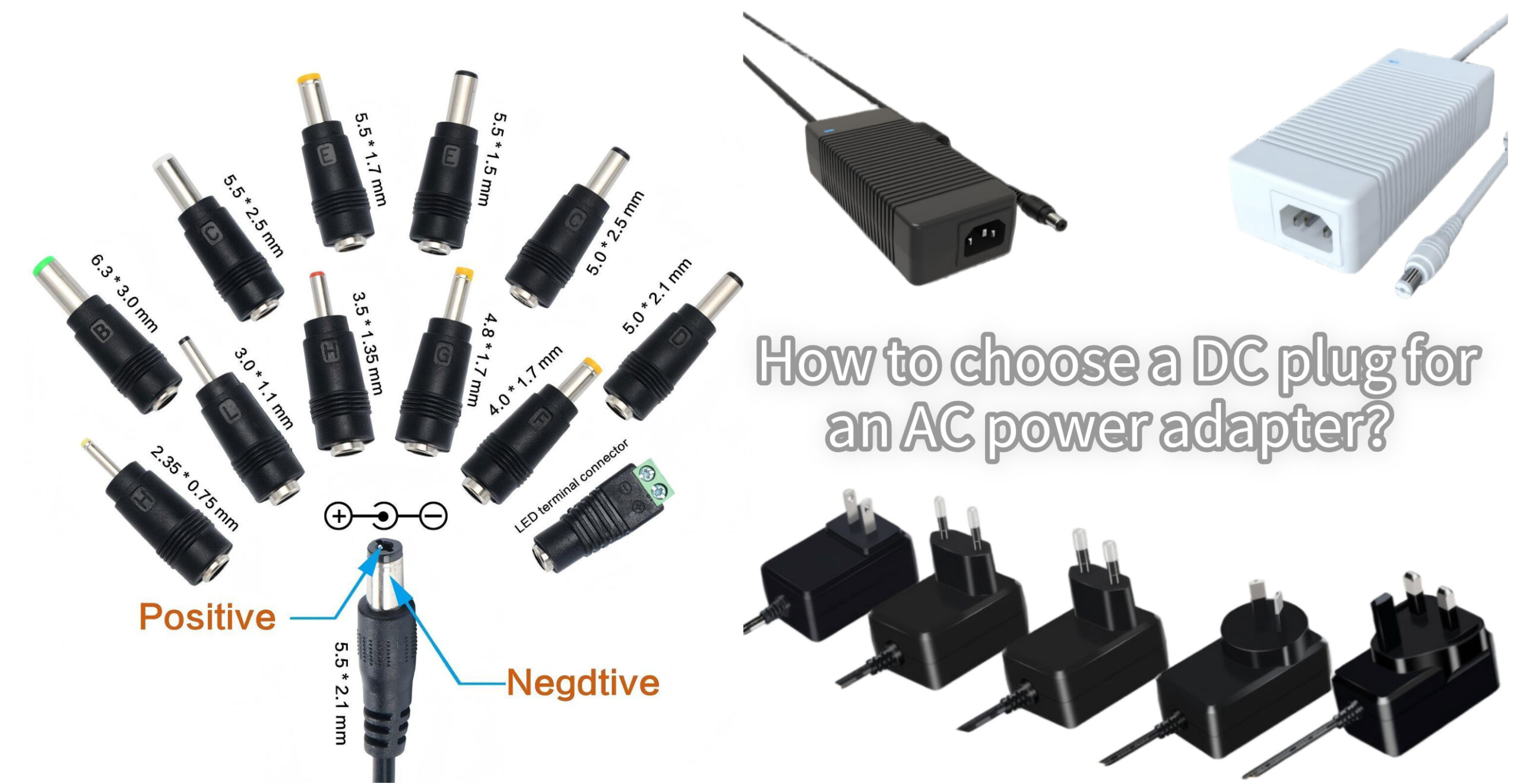
- What to look for: DC barrel plugs are defined by two key measurements:
- Outer Diameter (OD): The width of the outer metal sleeve.
- Inner Diameter (ID): The width of the inner hollow pin.
- How to get it right: Always measure in millimeters. The standard notation is “OD x ID” (e.g., 5.5mm x 2.1mm). The most common sizes are 5.5mm x 2.1mm and 5.5mm x 2.5mm, but variations like 3.5mm x 1.35mm are also frequent in smaller electronics.
- Pro Tip: Use a digital caliper for an exact measurement of your old plug or device’s jack. If unavailable, a size chart with visual comparisons can be a lifesaver.
Factor 2: Polarity – The Direction of Power Flow
Getting polarity wrong is the fastest way to destroy your device. It determines which part of the plug is positive (+) and which is negative (-).
- What to look for: Polarity is almost always marked on the device itself, near the power jack, or on the original adapter. Look for a symbol: a “C” with a dot in the center and a “+” and “-” sign.
- Center Positive (+ tip): The inner contact is positive, the outer sleeve is negative. (This is the most common configuration).
- Center Negative (- tip): The inner contact is negative, the outer sleeve is positive.
- How to get it right: Never assume. Always verify the polarity symbol on your device. Matching the new plug to your old adapter’s polarity is also a reliable method.
Factor 3: Voltage (V) – The Electrical “Pressure”
The plug must be part of a system that delivers the correct voltage.
- What to look for: The required voltage is printed on your device (e.g., “INPUT: 12V”). Your AC adapter’s OUTPUT voltage must match this exactly (e.g., 12V).
- How to get it right: The DC plug itself doesn’t have a “voltage rating” in the same way, but it must be used with an adapter that outputs the correct, matching voltage. Using a plug with an adapter of the wrong voltage can cause immediate damage.
Factor 4: Current (A) – The Electrical “Flow”
The plug and adapter must be able to handle the amount of current your device needs to operate.
- What to look for: Your device will list an input current (e.g., “2.0A”). Your AC adapter should have an output current rating equal to or greater than this number.
- How to get it right: Ensure the wires and connectors of your replacement plug are robust enough for the amperage. A plug intended for low-current devices (e.g., 0.5A) may overheat if used with a high-current adapter (e.g., 3A). When in doubt, choose a plug with a higher current rating.
Factor 5: Connector Type & Quality – Beyond the Barrel
Not all DC connections are simple barrels.
- What to look for:
- Type: Is it a standard barrel plug, a coaxial plug, or a proprietary connector (common in laptops and brand-specific electronics)?
- Length: Is the plug barrel long enough to fully seat in your device’s jack?
- Strain Relief: Does the plug have a flexible rubber boot where the cable enters? This prevents wire breakage.
- Sleeve Material: Insulated metal sleeves are safer and more durable than bare metal.
- How to get it right: Match the physical connector type first. Then, invest in a quality plug with good strain relief—it will last much longer and prevent connection issues.
Quick-Check Selection Checklist
Before you buy or solder, run through this list:
- Size: Measured OD x ID (e.g., 5.5mm x 2.1mm).
- Polarity: Confirmed center positive (+) or negative (-) from device label.
- Voltage: Plug will be used with an adapter matching device’s input voltage.
- Current: Plug/wiring is rated for the adapter’s output amperage.
- Quality: Has insulated sleeve, strain relief, and correct connector type.
DC Connector Sizes
DC electrical connectors come in a variety of sizes, each suited for different applications based on their inner diameter (ID) and outer diameter (OD):
- 0.7mm ID, 2.35mm OD: Used in small electronic devices like handheld gadgets or low-power chargers.
- 1.0mm ID, 3.8mm OD: Common in small appliances and low-voltage equipment.
- 1.3mm ID, 3.5mm OD: Suitable for compact electronics, such as audio-visual devices.
- 2.1mm ID, 5.5mm OD: One of the most popular sizes for consumer electronics, including routers and external hard drives.
- 2.5mm ID, 5.5mm OD: Used for slightly higher current requirements, often found in LED lighting and CCTV cameras.
- 3.0mm ID, 6.0mm OD: Frequently used in higher-powered devices such as medical equipment.
- 3.0mm ID, 6.3mm OD: This size is typically used for industrial and heavy-duty power connections.
Final Recommendation
For most universal replacements, a 5.5mm x 2.1mm center positive plug is the most common starting point. However, always verify with your specific device first. When sourcing, choose reputable electronics suppliers for higher-quality components that ensure safety and reliability.
By systematically checking these five factors, you transform a potentially risky guess into a simple, confident selection. Keep your devices powered safely and effectively.
Still unsure? Many suppliers offer multi-pack assortments of the most common sizes, which are perfect for hobbyists, IT technicians, or anyone who frequently works with various electronics.

About author









Add comment