











Input and Output Plugs for Your Power Adapter: A Complete Guide to Connections
Your power adapter is only as good as its connections. A perfect match in voltage, current, and polarity means nothing if the physical plugs don’t connect properly or safely. From the wall outlet to your device, every connection point presents unique considerations that affect performance, safety, and convenience. This comprehensive guide decodes the world of power adapter plugs—both input (where you get power) and output (where you deliver it)—helping you navigate specifications, regional variations, and compatibility challenges with confidence.
Chapter 1: Input Plugs – Connecting to the Grid
Understanding AC Input Plugs
Input plugs connect your adapter to wall outlets, drawing alternating current (AC) from the electrical grid. These vary dramatically by region, voltage, and safety standards.
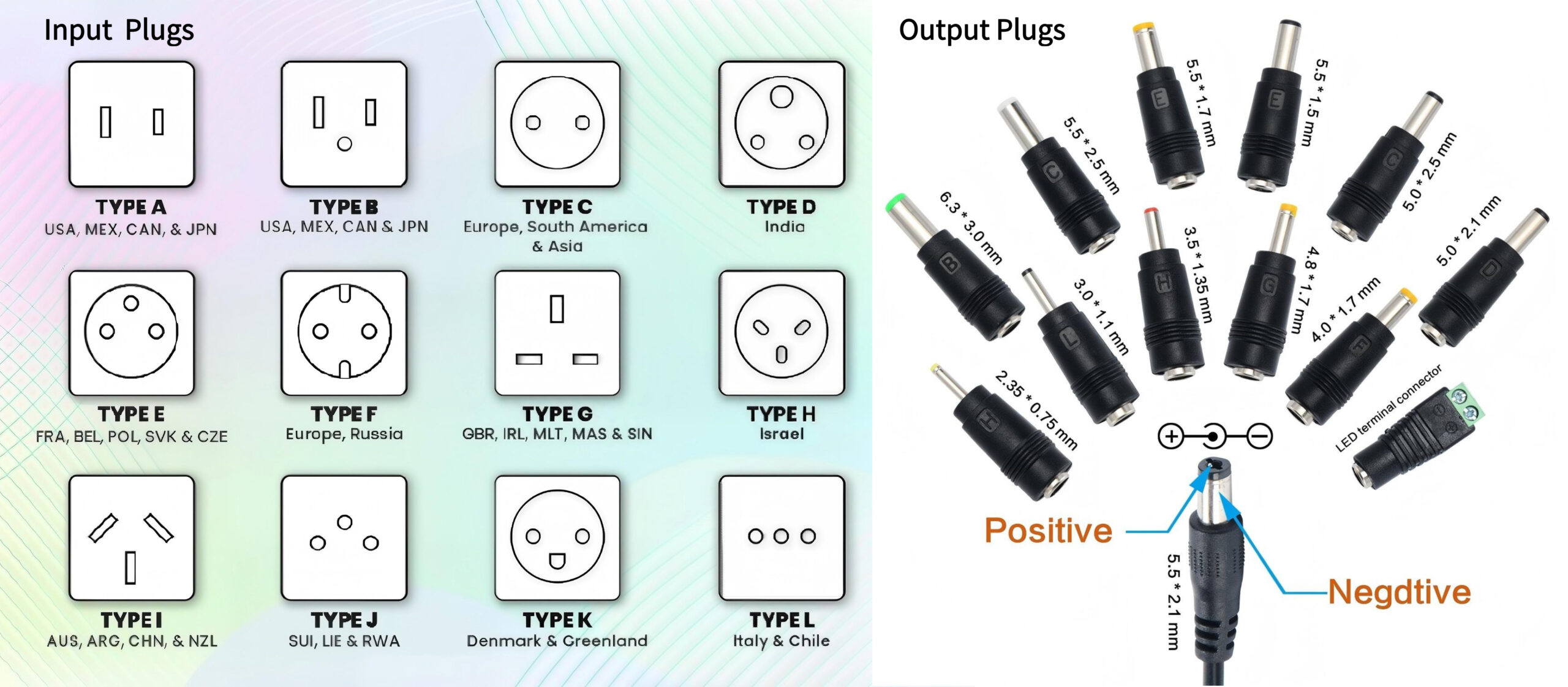
Global Plug Types: A World Tour
Type A (North America, Japan, parts of Central/South America)
- Appearance: Two flat parallel pins
- Voltage: 100-127V
- Key Features: Unpolarized (pins same size) or polarized (one wider)
- Safety Note: No grounding pin—safety depends on outlet design
Type B (North America, Japan, parts of Central/South America)
- Appearance: Two flat parallel pins + U-shaped ground pin
- Voltage: 100-127V
- Safety Advantage: Grounded connection for improved safety
- Common Use: Higher-power devices, medical equipment
Type C (Europe except UK/Ireland, parts of Asia/Africa)
- Appearance: Two round pins
- Voltage: 220-240V
- Nickname: “Europlug”
- Limitations: Unpolarized, ungrounded, max 2.5A
Type D (India, Nepal, Namibia, some Middle Eastern countries)
- Appearance: Three large round pins in triangular pattern
- Voltage: 220-240V
- Historical Note: British colonial legacy plug, still in limited use
Type E/F (Most of Europe, Russia, parts of Asia/Africa)
- Appearance: Two round pins + grounding contact (Type E: female, Type F: male)
- Voltage: 220-240V
- Common Standard: “Schuko” (Schutzkontakt = protective contact)
- Safety: Polarized with grounding, supports higher currents
Type G (UK, Ireland, Malta, Malaysia, Singapore, Hong Kong)
- Appearance: Three rectangular pins in triangular pattern
- Voltage: 220-240V
- Safety Features: Fused plug (3A, 5A, or 13A), shutters on live/neutral
- Distinctive: Bulkiest common design
Type I (Australia, New Zealand, China, Argentina)
- Appearance: Two slanted flat pins + vertical ground pin (inverted V)
- Voltage: 220-240V
- Variations: Different pin thickness for Australia vs. China
Input Voltage Considerations
Universal Input vs. Regional Specific:
Universal Input Adapters:
- Accept 100-240V AC, 50/60Hz
- Ideal for travel, global products
- Internally switch to correct voltage

Regional Adapters:
- Accept specific voltage only (e.g., 120V or 230V)
- Lower cost, smaller size
- Will fail if plugged into wrong voltage
Critical Check: Always verify input voltage range on adapter label before connecting to any outlet.
Safety Certifications for Input Plugs
Regional Safety Marks:
- North America: UL/CSA marks
- Europe: CE mark (plus national marks like VDE, KEMA)
- UK: BS mark
- Australia/New Zealand: RCM mark
- International: IEC standards
What Certification Ensures:
- Proper insulation and creepage distances
- Adequate pin thickness and material
- Temperature resistance
- Mechanical durability (insertion/withdrawal cycles)
Chapter 2: Output Plugs – Delivering Power to Your Device
The Barrel Connector: Most Common but Confusing
Anatomy of a Barrel Plug:
Outside (Sleeve/Barrel) ── usually negative
Insulation Gap
Inside (Tip/Pin) ──────── usually positive
Critical Specifications:
- Outer Diameter (OD): 3.5mm to 8.0mm (common: 5.5mm)
- Inner Diameter (ID): 1.3mm to 3.5mm (common: 2.1mm, 2.5mm)
- Length: How far the plug inserts into the jack
- Polarity: Center-positive (most common) or center-negative
The Measurement Problem:
- 5.5mm×2.1mm vs. 5.5mm×2.5mm looks identical but aren’t compatible
- 0.4mm difference can cause poor connection or damage
- Solution: Use digital calipers for precise measurement
Common Barrel Plug Sizes and Applications:
| Size (OD×ID) | Common Voltage | Typical Devices |
|---|---|---|
| 5.5×2.1mm | 12V, 19V | Routers, monitors, some laptops |
| 5.5×2.5mm | 9V, 12V | Audio equipment, some consumer electronics |
| 3.5×1.35mm | 5 โวลต์ | Small electronics, some USB hubs |
| 4.0×1.7mm | 9V | Guitar pedals, some network devices |
| 6.3×3.0mm | 19V-24V | Some laptops, larger monitors |
Proprietary Connectors
Laptop-Specific Designs:
- Dell: Barrel with center pin (communicates with laptop)
- Lenovo: Square tip (slim tip or rectangular)
- HP: Various, often with center pin
- Apple (pre-USB-C): MagSafe (magnetic), different generations
Key Features of Proprietary Connectors:
- Communication pins for smart charging
- Unique mechanical designs to prevent incorrect connections
- Often manufacturer-specific (limits third-party options)
- Higher cost to replace
USB Connectors as Output Plugs
USB-A: Still common for lower-power devices (5V, up to 2.4A)
USB-C: Becoming universal standard (5-48V via PD, up to 240W)
Micro-USB: Legacy for small devices (5V, up to 2A)
USB-C Output Advantages:
- Reversible insertion
- Power Delivery negotiation
- Data + power in one cable
- Increasingly mandated by regulations
Specialty Connectors
Audio Equipment:
- DC Power Jacks: Often center-negative for guitar pedals
- Locking Connectors: Prevent accidental disconnection on stage
Medical/Industrial:
- Locking Mechanisms: Twist-lock or screw-lock
- Weatherproofing: Sealed against moisture/dust
- Keyed Designs: Prevent incorrect mating
Aviation/Military:
- MIL-SPEC connectors: Extreme durability
- Circular connectors: Multiple pins for power/data
- Environmental sealing: Operate in harsh conditions
Chapter 3: Plug Compatibility and Adapters
When Plugs Don’t Match: Adapter Solutions
Input Side (Travel Adapters):
Physical adapters: Change plug shape only
- Do NOT convert voltage
- Ensure proper grounding if needed
- Check compatibility with outlet design

Example: UK plug (Type G) → EU outlet (Type C)
Requires: Physical adapter
Warning: UK plug has fuse, EU outlet doesn't
Voltage Transformers vs. Adapters:
- Adapter: Changes plug shape only
- Transformer/Converter: Changes voltage (110V↔220V)
- Modern Solution: Use universal input adapter (100-240V) + plug adapter
Output Side (Plug Converters):
Barrel Plug Adapters:
Female: 5.5×2.5mm → Male: 5.5×2.1mm
Cost: $2-5
Considerations: Maintains polarity, adds length
Quality: Look for gold plating, strain relief
Gender Changers:
- Female-to-male or male-to-female
- Useful for extending cables or changing connection direction
- Ensure current rating matches requirements
USB Converter Tips:
- USB-A to USB-C cables enable charging newer devices from older adapters
- USB-C to barrel adapters available for many common sizes
- Warning: Quality matters—poor converters can damage devices
Universal/Interchangeable Tip Adapters
How They Work:
- Base adapter with detachable output cord
- Multiple tips for different devices
- Often include voltage selection switch
Advantages:
- One adapter for many devices
- Compact for travel
- Cost-effective over buying multiple adapters
Limitations:
- Tips can be lost
- May not support high wattage (>65W)
- Quality varies dramatically
Recommended Brands:
- iClever: Good selection of tips
- LENCENT: Affordable, includes car adapter
- Bestek: Higher wattage options
- Key Considerations: Tip retention mechanism, cable quality, safety certifications
Chapter 4: Plug Specifications and How to Read Them
Decoding Plug Labels and Specifications
Input Plug Markings:
Example: 10A 250V~
- 10A: Maximum current rating
- 250V: Maximum voltage rating
- ~: Alternating current (AC)
Safety Symbols:
- Double Square: Double insulation (no ground needed)
- CE: European conformity (self-declared)
- UL/CSA: North American safety certification
- H05VV-F: European cable type designation
Output Plug Specifications:
On adapter label:
- DC OUTPUT: 12V ⎓ 2.0A
- ⎓: Direct current symbol
- Polarity diagram: ⚡---(+)---○---(-)---
Measuring and Identifying Unknown Plugs
Step-by-Step Identification Process:
- Visual Inspection:
- Count pins/contacts
- Note shape and arrangement
- Look for markings or symbols
- Physical Measurement:
- Barrel plugs: Use digital calipers for OD and ID
- Pin spacing: Measure center-to-center distance
- Overall dimensions: Note length and width
- Polarity Testing (if adapter available):
- Use multimeter on DC voltage setting
- Red probe to center, black to barrel
- Positive reading = center-positive
- Negative reading = center-negative
- Reference Guides:
- Online plug databases
- Manufacturer specifications
- Replacement part websites
Common Identification Challenges:
- Worn labels
- Non-standard designs
- Multiple similar sizes
- Modified or repaired plugs
Connector Standards and Nomenclature
IEC 60320 (Appliance Couplers):
- C5/C6: Cloverleaf (laptop power)
- C7/C8: Figure-8 (double-insulated devices)
- C13/C14: Standard computer power
- C19/C20: Higher current (servers, workstations)
Understanding the Codes:
- Even number = female connector (socket)
- Odd number = male connector (plug)
- Example: C14 plug mates with C13 socket
Advantages of IEC Connectors:
- International standard
- Easy to find replacements
- Variety of current ratings
- Safe disconnect design
Chapter 5: Plug Quality and Durability Factors
Materials and Construction
Contact Materials:
- Brass: Common, good conductivity, may oxidize
- Phosphor Bronze: Springier, better fatigue resistance
- Beryllium Copper: Best spring properties, expensive
- Plating:
- Nickel: Hard, corrosion-resistant
- Gold: Best conductivity, expensive, thin layer over nickel
- Tin: Economical, oxidizes over time
Insulation Materials:
- PVC: Common, flexible, various colors
- Rubber: Excellent flexibility, cold-resistant
- TPE/TPU: Balance of flexibility and durability
- Silicone: High temperature resistance, very flexible
Cable Construction:
- Strand count: More strands = more flexible
- Gauge (AWG): Lower number = thicker wire
- 18 AWG: Up to 10A
- 20 AWG: Up to 5A
- 22 AWG: Up to 3A
- Shielding: Foil or braid for noise reduction
Strain Relief and Durability Features
Critical Failure Point: Where cable meets plug
Effective Strain Relief Designs:
Molded Plug:                  Add-on Strain Relief:
Cable → Overmolding → Plug    Cable → Clamp → Spring → Plug
Advantage: Sealed             Advantage: Repairable
Disadvantage: Not repairable  Disadvantage: Bulkier
Bend Radius Protection:
- Spring coils at connection point
- Flexible “gooseneck” section
- Angled plugs (90° or 45°) to reduce strain
Durability Ratings:
- Insertion Cycles: Quality plugs rated for 5,000-10,000 insertions
- Pull Force: Withstand 30-50N of force
- Flex Cycles: 10,000+ bends without failure
Quality Indicators by Price Point
Budget (< $15):
- Basic molded construction
- Minimal strain relief
- Tin or nickel plating
- 1-year warranty typical
Mid-Range ($15-40):
- Improved strain relief
- Gold-plated contacts
- Braided or reinforced cable
- 2-3 year warranty
Premium ($40+):
- Advanced materials (Kevlar reinforcement)
- Industrial-grade connectors
- Extensive testing certification
- Lifetime warranty
Chapter 6: Special Applications and Considerations
Medical and Healthcare Applications
Unique Requirements:
- Leakage Current Limits: <100µA (Type BF) or <10µA (Type CF)
- Isolation: Enhanced insulation systems
- Connector Design: Often different colors or shapes to prevent misconnection
- Standards: IEC 60601-1 series
Common Medical Plug Types:
- IEC 60601-1 compliant: Modified C13/C14 with insulation
- DIN connectors: For specific equipment
- Custom designs: Manufacturer-specific for patient safety
Industrial and Outdoor Use
Environmental Protection:
- IP Ratings: IP67 (dust tight, waterproof to 1m)
- UV Resistance: For outdoor/sunlight exposure
- Temperature Range: -40°C to +85°C for extreme environments
- Chemical Resistance: Oil, solvents, cleaning agents
Mechanical Protection:
- Metal shell connectors
- Screw-lock or bayonet-lock mechanisms
- Strain relief clamps
- Overmolded or potted connections
High-Current Applications
Connectors for >10A Applications:
- Anderson Powerpole: Modular, up to 350A
- XT60/XT90: Popular in RC/hobby applications
- Bullet connectors: Simple, high current capacity
- IEC 60309: Industrial “Commando” plugs (16A, 32A, 63A variants)
Considerations for High Current:
- Contact surface area
- Plating thickness
- Spring pressure
- Heat dissipation
Audio/Video Equipment
Common Connectors:
- 2.1mm center-negative: Guitar pedals
- 2.5mm center-positive: Some audio interfaces
- 4-pin XLR: Professional video equipment (12V)
- 4mm banana plugs: Test equipment, some pro audio
Noise Considerations:
- Shielded cables for clean power
- Separate power from audio cables
- Ferrite cores on cables to reduce RFI
Chapter 7: Troubleshooting Common Plug Problems
Connection Issues and Solutions
Problem: Plug fits but no power
- Check: Polarity (50% of issues)
- Check: Voltage with multimeter
- Check: Internal fuse in plug (some UK plugs)
- Solution: Verify all specifications match
Problem: Loose connection
- Cause: Worn connector, wrong size
- Check: Plug wobble in socket
- Measure: Actual plug vs. socket dimensions
- Solution: Replace with correct size, consider locking connector
Problem: Intermittent power
- Check: Cable flex near plug
- Check: Internal solder joints
- Check: Oxidation on contacts
- Solution: Clean contacts, repair strain relief
Problem: Overheating at plug
- Causes: Poor contact, undersized wire, high resistance
- Check: Temperature after 30 minutes use
- Measure: Voltage drop across connection
- Solution: Replace with higher-quality/higher-current plug
Repair vs. Replace Decision Matrix
| Issue | Repair Possible? | Cost | Skill Required | Recommended Action |
|---|---|---|---|---|
| Loose strain relief | Yes | $2-5 | Low | Add heat-shrink or adhesive-lined shrink tubing |
| Broken cable near plug | Yes | $3-8 | Medium | Cut and reterminate with new plug |
| Cracked plug housing | Temporary | $1-3 | Low | Electrical tape as interim, replace soon |
| Bent pins | Sometimes | $0 | Low-Medium | Carefully straighten, test thoroughly |
| Corroded contacts | Yes | $1-2 | Low | Clean with contact cleaner, mild abrasive |
| Intermittent internal connection | No | – | High | Replace entire cable assembly |
Safety Checks Before Reusing Old Plugs
Visual Inspection Checklist:
- No cracks or damage to insulation
- Pins straight and intact
- No discoloration from overheating
- Strain relief intact
- Cable not frayed or cut
- Markings legible
Electrical Testing:
- Continuity test (pin to cable end)
- Insulation resistance (>1MΩ)
- Polarity verification
- No short between pins
When to Definitely Replace:
- Any sign of melting or burning
- Exposed conductors
- Cracked ground pin (on grounded plugs)
- Uncertain history (water damage, etc.)
Chapter 8: Future Trends in Power Connectors
The Move Toward Universal Standards
USB-C Dominance:
- Regulatory push: EU mandate accelerating adoption
- Power Delivery evolution: Up to 240W with PD 3.1
- One connector for everything: Power, data, video
Wireless Power Advancements:
- Qi2 standard: Magnetic alignment for faster wireless charging
- Long-distance wireless: Still developing, efficiency challenges
- Industrial applications: Contactless power for harsh environments
Smart Connectors
Communication Capabilities:
- Authentication: Device verifies genuine charger
- Power negotiation: Dynamic optimization
- Health monitoring: Reports wear, predicts failure
- Examples: Apple MagSafe, Dell barrel-with-pin
Integrated Intelligence:
- Temperature sensors in plugs
- Usage tracking for maintenance prediction
- Firmware-updatable via data lines
Sustainability Initiatives
Modular Designs:
- Replaceable plugs for different regions
- User-replaceable cables
- Standardized interfaces to reduce e-waste
Material Innovations:
- Bioplastics for housings
- Recycled metals for contacts
- Longer-lasting designs (10,000+ cycle targets)
Regulatory Pressures:
- Right-to-repair legislation
- Recyclability requirements
- Reduction of single-use packaging
Specialized Connector Evolution
High-Speed Data + Power:
- Thunderbolt 4/USB4: 40Gbps + 100W
- Future standards integrating even higher capabilities
Extreme Environment Designs:
- Space-rated connectors (vibration, thermal cycling)
- Deep-sea applications (pressure, corrosion)
- High-radiation environments (nuclear, medical)
Miniaturization:
- Smaller connectors for wearable devices
- Higher power density in same size
- Flexible/stretchable connectors for new form factors
Conclusion: Mastering Your Connections
The plugs on your power adapter are the critical interface between electrical safety and device functionality. Understanding both input and output connectors empowers you to:
- Choose the right adapter for your devices and location
- Troubleshoot connection problems effectively
- Make informed repair vs. replace decisions
- Plan for future compatibility as standards evolve
Key Takeaways:
For Input Plugs:
- Know your regional plug type and voltage
- Universal input (100-240V) is best for travel
- Safety certifications are non-negotiable
For Output Plugs:
- Measure precisely—millimeters matter
- Polarity must be correct (center-positive is common)
- Quality construction prevents failures
When in Doubt:
- Consult device manuals or manufacturer specifications
- Use proper measurement tools (calipers, multimeter)
- When replacing, match exactly or use quality adapters
- Prioritize safety over convenience
The world of power connectors is moving toward greater standardization (led by USB-C) while still supporting legacy systems. By understanding both the universal trends and specific requirements of your devices, you can ensure reliable, safe power delivery in any situation.
Final Checklist for Any Power Connection:
- Voltage matches exactly
- Current rating is sufficient
- Polarity is correct
- Plug fits securely
- Cable is undamaged
- Adapter is properly certified
- Connection remains cool during use
Whether you’re powering a smartphone or a server rack, the principles remain the same: the right connection, properly made, with quality components, ensures performance, safety, and reliability.
Need help identifying a connector or finding a replacement? Our technical support team can help you decode plug specifications and source compatible replacements. Send clear photos with measurements for the fastest assistance.

About author








Add comment